The default Font for the video library is san-serif font such as Arial or Helvetica.
You can add custom fonts using a font service such as Google Fonts or Adobe Typekit.
Find the Font from a supported font library
The following font libraries are supported:
Font Loader Code
This should be the loader script for the font service. Eg. for Google fonts:
See sample below if you are unsure where to generate this from.
Font Family Heading
The font family declaration for Headings.
'Paytone One', sans-serif
Font Family Body
The font family declaration for Body text and buttons. This can be the same or different than the headings.
'Source Sans Pro', sans-serif
Sample:
The easiest way is to copy the embed font code from fonts.google.com:
- Click 'Customize' to change the weight of the font. This will reflect in the embed code:
Add the Font to your Video Library
- Browse to Admin >Appearance >Customize >Fonts tab
- Paste your Font Code
- Add the Heading and Body Font Family
Font settings should look similar to this: 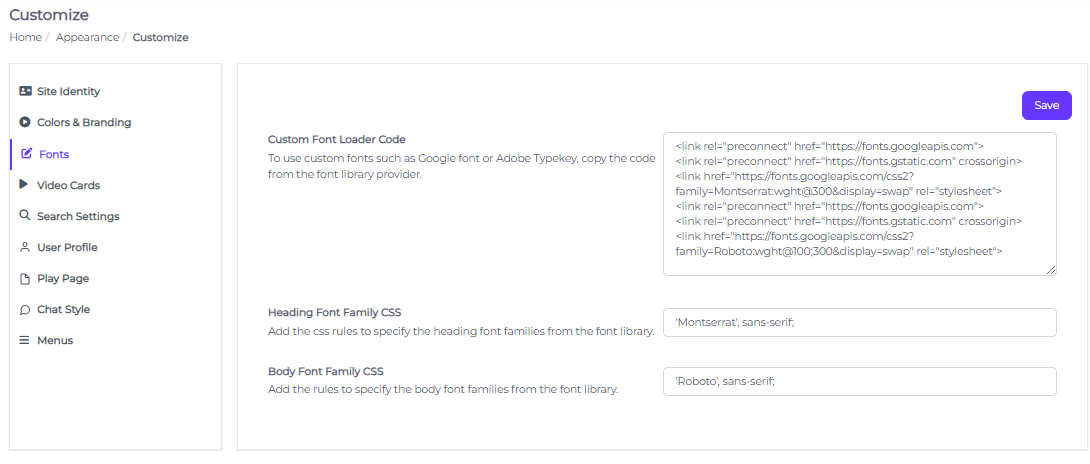
-
Save
The Font should now be reflective on your content library.